Tufting Gun Scissors Not Cutting? (How to Stop the "Looping" Nightmare)
Table of Contents
You bought a Cut Pile tufting gun for a reason. You want that fluffy, shaggy finish.
But right now, you are pulling the trigger, and instead of nice individual strands, your gun is leaving a continuous loop of yarn connected to the cloth. You have to stop every three seconds to cut the yarn with handheld scissors. It’s annoying, it’s slow, and it’s ruining your flow.
If you are frantically Googling “tufting gun scissors not cutting,” you have likely convinced yourself that your scissors are dull or that you bought a broken machine.
Good news: Your machine is (probably) not broken. Better news: You can fix this in 5 minutes with a single Allen key.
The problem is almost never “dull scissors.” The problem is Timing. In this guide, I am going to teach you how to adjust the “Closing Block” on your AK-1 (and similar models) so your scissors snap shut at the exact right millisecond.
The "Manual Gear" Test (Do This First)
Before we unscrew anything, we need to see exactly what is happening inside the machine.
WARNING: Always unplug your tufting gun before touching the gears. I cannot stress this enough. Do not lose a finger for a rug.
Unplug the gun.
Lay it on a table.
Look at the big White Gear on the side of the gun.
Use your hand to slowly rotate that white gear.
As you turn the gear, watch the needle move forward. Just as the needle reaches its furthest point (closest to the cloth), the scissors should pop out of the needle hole and SNAP shut.
If they snap shut: Your scissors are working mechanically, and the issue might be yarn tension (Skip to Reason #4).
If they stay open: You have found the problem. Your Closing Block has shifted.
Fix #1: Adjusting the "Closing Block" (The 90% Solution)
This is the reason for 9 out of 10 “tufting gun scissors not cutting” complaints.
There is a small metal block near the front of your gun (usually black or silver). Its only job is to bump into the scissors and force them to close. Because tufting guns vibrate like crazy, this block often rattles loose and slides backward by 1-2 millimeters.
When it slides back, it “misses” the scissors. The scissors extend, but nothing hits them to close them.
The Step-by-Step Fix:
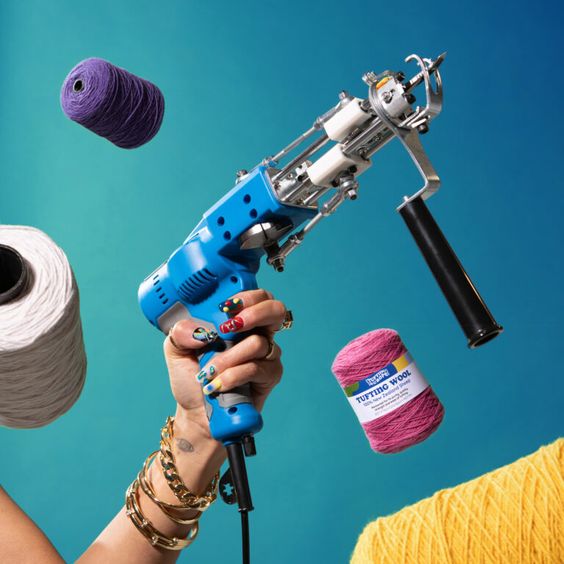
Locate the Block: Look at the front of the gun (near the needle). You will see a small metal L-bracket held in place by a single screw (usually an Allen head screw).
Loosen the Screw: Take the smallest Allen key that came with your gun. Turn the screw slightly to loosen it (don’t take it all the way out!).
The Nudge: Slide that metal block forward (towards the needle tip) by just a tiny bit. I’m talking 1 or 2 millimeters.
Tighten It: Lock the screw back down tight.
Test It: Rotate the big white gear by hand again.
Did the scissors close this time?
If yes: You fixed it.
If no: Nudge the block forward a tiny bit more.
Pro Tip: Don’t push it too far forward, or the scissors will close too early and cut the yarn before it’s even in the cloth. You want them to close exactly when the needle is fully extended.
Fix #2: The Scissors Are Dull (The 10% Solution)
If you adjusted the block and the scissors are definitely closing, but the yarn is just “bending” between the blades instead of cutting, then yes—your scissors might actually be dull.
This happens if you hit the metal frame of your tufting stand or if you’ve been tufting for 6+ months straight.
How to Replace Tufting Gun Scissors
You don’t need a new gun; you just need a $15 replacement part.
Unscrew the Bottom Plate: There are usually 4 screws holding the front needle assembly to the body.
Remove the Scissor Assembly: The scissors are attached to a long metal bar.
Swap: Unscrew the old scissors and screw in the new ones.
Crucial Step: When you put the new scissors in, make sure they curve upwards slightly. If you put them in upside down, they won’t cut anything.
(Note: If you need replacement scissors, check the links at the bottom of this page).
Fix #3: Your Yarn is "Too Thin"
Sometimes, the machine is fine, but the yarn is the problem.
Tufting gun scissors are industrial tools. They are designed to slice through thick acrylic or wool yarn. If you are using very thin yarn (like embroidery thread) or just a single strand of thin worsted weight yarn, the scissors might not “catch” it. It’s like trying to cut a single hair with garden shears.
The Fix:
Always thread two strands of yarn into your gun at once.
The extra thickness helps the scissors “bite” and ensures a clean cut every time.
Fix #4: The "Opener" Block is in the Way
Just like there is a block to close the scissors, there is another block further back that opens them.
If your scissors are cutting, but then they get stuck closed (so the next piece of yarn can’t get in), your Opener Block is misaligned.
The Diagnosis: Rotate the white gear. Do the scissors snap shut and then stay shut as they retract?
The Fix: Find the “Opener” block (further back on the rail). Loosen it and nudge it forward (towards the needle) so it hits the scissors earlier on the return stroke.
Conclusion: Don't Be Afraid of the Allen Key
I know it’s scary to take a wrench to your expensive new toy. But tufting guns are not iPhones; they are simple mechanical tools. They vibrate, they shake, and screws get loose.
If you are asking “why is my tufting gun scissors not cutting,” it is almost always just a loose screw on that front Closing Block.
Summary of the Fix:
Unplug the gun.
Rotate the white gear by hand.
Nudge the Closing Block forward 2mm.
Tighten and test.
Now that your scissors are snapping again, go finish that rug!